 solisden
Surfshark Antivirus: an independent guide to what it does and does not do
A plain-language look at what Surfshark Antivirus includes, which devices it runs on, what independent testing shows, how the subscription works, and when the protection already built into your computer may be enough.
Key points
- Surfshark Antivirus is not sold on its own. At the time of writing it comes in the Surfshark One and One+ bundles, not in the VPN-only Starter plan.
- Surfshark lists Windows 10 or later, macOS 11 (Big Sur) or later and 64-bit Android 10 or later, for up to 5 devices. There is no iPhone or iPad version of the antivirus.
- AV-TEST has certified it. Surfshark quotes 6/6 for protection, 4.5/6 for performance and 6/6 for usability. It was not in AV-TEST's July–August 2026 Windows test.
- Built-in protection such as Microsoft Defender also scores highly in independent tests. Many people pay for a suite because of the extras, not because the built-in option is weak.
- Subscriptions renew automatically. Surfshark offers a 30-day money-back guarantee. Check the renewal price before you buy.
What Surfshark Antivirus is
Surfshark is best known for its VPN. Its antivirus is a separate app that scans files on your device for malware. It is not sold on its own: Surfshark's own product page says it is only available in a bundle. The pricing page currently shows three tiers. Starter is the VPN only. One adds the antivirus and other security tools. One+ adds more on top. Tier names and contents change from time to time, so check the pricing page before you rely on this list.
- Sold as
- Part of Surfshark One and One+ (not standalone)
- Platforms
- Windows 10 or later; macOS 11 Big Sur or later; Android 10 or later (64-bit only)
- Not supported
- Windows on ARM; 32-bit Android; iOS/iPadOS (no antivirus app)
- Devices
- Up to 5 devices for the antivirus, per Surfshark. The VPN has its own rules.
- Refund
- 30-day money-back guarantee, per Surfshark
Source: Surfshark's product and pricing pages, checked on 5 October 2026. If anything here differs from Surfshark's own current information, Surfshark's information wins.
Do you need a third-party antivirus?
An earlier version of this page said built-in protection is “only a safety net” that cannot block malicious websites or ransomware. That is not accurate, so we have removed it. Modern operating systems ship with serious protection:
- Windows includes Microsoft Defender Antivirus. It provides real-time and cloud-based protection, SmartScreen checks for websites and downloads, and an optional anti-ransomware feature called Controlled folder access. In AV-TEST's July–August 2026 Windows 11 test, Microsoft Defender scored 6/6 for protection, 5.5/6 for performance and 6/6 for usability, and won a “Top Product” award.
- macOS uses Gatekeeper, notarisation and the XProtect malware detector.
- Android devices with Google Play include Google Play Protect, which scans apps.
- iOS and iPadOS keep apps in a sandbox. That is why traditional antivirus apps for the iPhone don't exist.
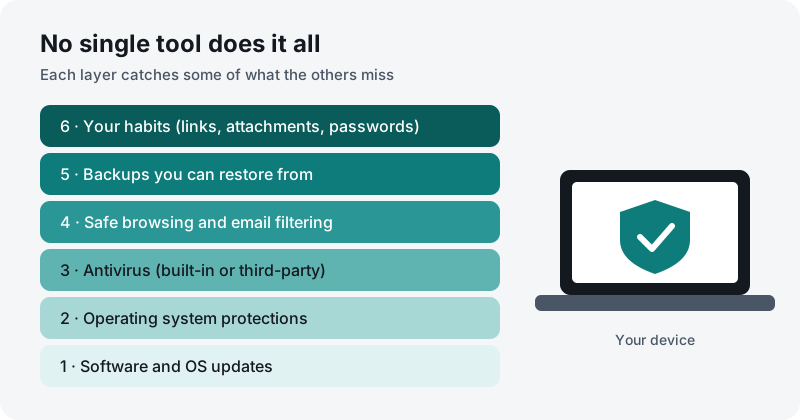
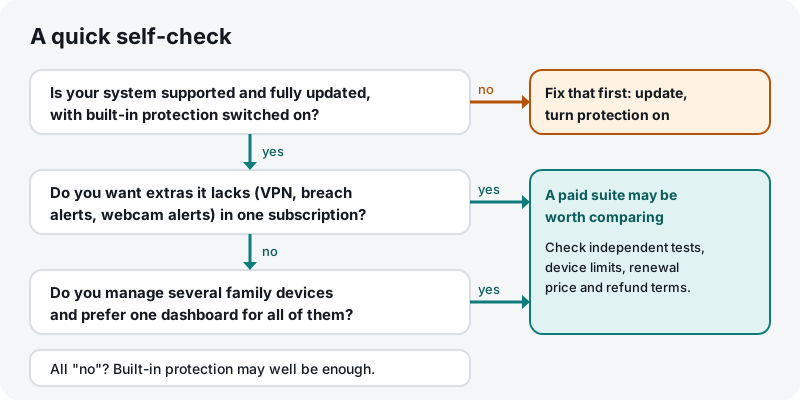
So a paid suite is usually a choice, not a necessity. People tend to pay for one because they want features the built-in tools lack, one account for a mixed family of devices, or a single place to manage everything. Our guide to built-in protection explains how to check that yours is switched on.
How antivirus detection works
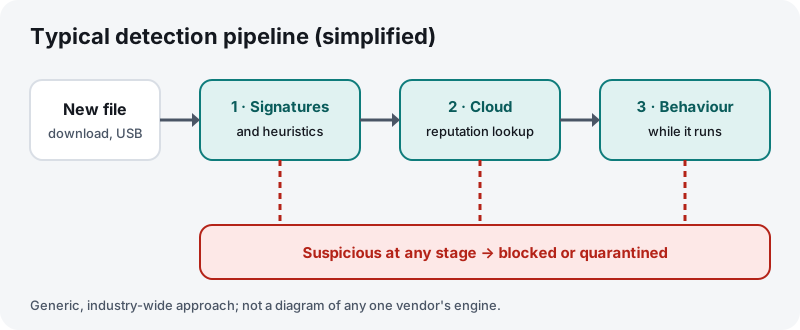
Almost every current antivirus product combines several techniques. This is a general description of the industry, not of any one vendor's engine.
- Signatures and heuristics. Files are compared against a database of known malware. Heuristic rules flag code that looks like known malware even when the exact file is new.
- Cloud reputation. The product sends a fingerprint or other details of an unknown file to the vendor's servers. There it can be checked against far larger, constantly updated data.
- Behaviour monitoring. A program that passes the first checks is watched while it runs. Actions typical of malware, such as rapidly encrypting many files, can trigger a block.
Each technique has trade-offs. Signatures miss brand-new threats. Heuristics and behaviour rules can flag legitimate software (a “false positive”). Cloud lookups depend on a connection and mean some file details leave your device. This is why independent tests measure false positives as well as detection.
Features, as described by Surfshark
We have not lab-tested these features ourselves. This list is what Surfshark's product page says, checked on 5 October 2026:
- Real-time protection that scans files as they are downloaded, installed and used.
- Cloud Protect, Surfshark's name for its cloud-based checks.
- Zero-day threat detection, meaning detection aimed at threats not yet in signature databases.
- Webcam protection with alerts when an app tries to use the camera.
- Full, quick, custom and scheduled scans.
- Virus database updates every three hours, according to Surfshark.
The One bundle also includes other Surfshark services that are not antivirus features, such as the VPN and data-breach alerts. Check the pricing page for the current list.
Limits and what we could not confirm
Earlier versions of this page made claims that we could not find in Surfshark's own material, or that were wrong. We have removed or corrected them:
- Protection on iOS. There is no Surfshark Antivirus app for iPhone or iPad. Surfshark lists Windows, macOS and Android only.
- “Up to 10 devices”. Surfshark states up to 5 devices for the antivirus.
- Ransomware file rollback and email attachment scanning. We could not find these on Surfshark's antivirus page, so we do not claim them.
- A built-in password manager and “safe banking mode”. Neither is listed in Surfshark's current plans.
- “Machine-learning models run locally, so your data never leaves your device”. Surfshark describes cloud-based protection, so some file details may be checked on its servers.
- “Free trial, no credit card required” and “no forced auto-renewal”. Subscriptions renew automatically unless you cancel. Any trial terms depend on the platform and are set by Surfshark.
- A 5-year plan. The pricing page shows 1-month, 1-year and 2-year terms.
- “Join millions of users”. We could not verify any user number for the antivirus specifically.
Other limits that Surfshark itself lists: the antivirus does not support Windows on ARM devices or 32-bit Android.
Independent test results
An earlier version of this page claimed “99%+ detection in all independent tests”. We could not support that claim, so we have replaced it with what we could check:
- Surfshark announced that AV-TEST certified Surfshark Antivirus. Its product page quotes AV-TEST scores of 6/6 protection, 4.5/6 performance and 6/6 usability, 16.5 out of 18 in total.
- Under AV-TEST's published rules, a product is certified from 10 points and gets the “Top Product” award from 17.5 points. A 16.5 score means certified, but not Top Product.
- Surfshark did not appear in AV-TEST's July–August 2026 Windows 11 home-user test, the latest we checked. Results vary from one test round to the next. Look up the round and date behind any score you see quoted, including ours.
In other words, the protection scores look strong. The weaker performance score suggests it may slow some everyday tasks more than the best-scoring products. Our guide to reading antivirus test results explains what the three scores measure.
Plans, renewal and refunds
Prices change often and depend on your country and on promotions, so we don't print them here. What we can say from Surfshark's pricing page:
| Term | How billing works (per Surfshark) |
|---|---|
| 1 month | Renews every month |
| 1 year | Renews every 12 months |
| 2 years | Billed once up front, then renews annually after the first term |
- Introductory and renewal prices often differ. Check the renewal price before you pay. If you don't want to renew, turn off auto-renewal in your account.
- Money-back guarantee: Surfshark says you can ask for a refund within 30 days of signing up. Read the conditions on its site.
- EU consumers also have statutory rights under EU and national law, separate from any guarantee the provider offers.
Ransomware: what antivirus can and cannot do
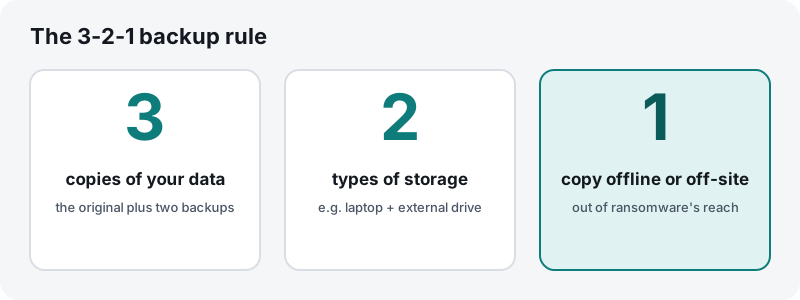
Ransomware encrypts your files and demands payment to unlock them. Antivirus can block many known ransomware strains, and behaviour monitoring can stop some new ones. But no product catches everything. Government agencies such as the US Cybersecurity and Infrastructure Security Agency (CISA) and the UK's National Cyber Security Centre (NCSC) give the same core advice: keep systems updated, be careful with links and attachments, and keep backups that ransomware cannot reach.
On Windows, you can also turn on Microsoft's Controlled folder access. It stops programs you haven't approved from changing files in protected folders. It sometimes blocks legitimate apps, which you can then allow.
Checklist after installing any antivirus
- Run a full scan once, then let real-time protection do its job.
- Make sure only one real-time antivirus is active. On Windows, Defender switches itself to passive mode when another antivirus registers.
- Check that automatic updates work, both for the antivirus and for the operating system.
- Look at quarantine notifications before you restore anything. If you are unsure, leave the file in quarantine.
- Note your renewal date and price, and set a reminder.
- Set up backups, including one copy kept offline.
- Turn on two-factor authentication for email and banking. Antivirus does not protect stolen passwords.
Who it may suit, and who may not need it
May suit you if…
- You already want a VPN and the other services in Surfshark One, and like having them under one account.
- You use Windows, Mac and Android devices and want one antivirus across them, within the 5-device limit.
- You want webcam-access alerts and scheduled scans in a simple interface.
May not be necessary if…
- You only use Windows, keep it updated and are happy with Microsoft Defender.
- You mostly use an iPhone or iPad. There is no Surfshark Antivirus app for iOS.
- You use a Windows-on-ARM laptop, which Surfshark lists as unsupported.
- You don't want an auto-renewing subscription.
Our assessment
Surfshark Antivirus is a certified, conventional antivirus. Its AV-TEST protection and usability scores are strong, and its performance score is middling. It makes most sense for people who want the Surfshark One bundle anyway. For someone who only wants malware protection on an up-to-date Windows PC, the built-in Microsoft Defender has scored comparably or better in AV-TEST's recent rounds and costs nothing extra. We give no star rating, because we have not run our own lab tests and a number would suggest a precision we don't have.
How this page is funded
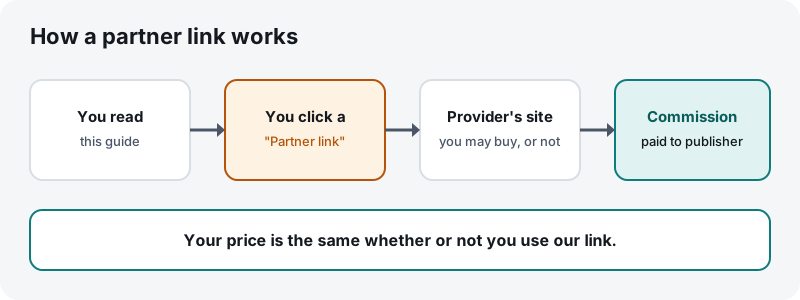
solisden.online has no subscription and shows no display ads. It is funded through partner links like the ones on this page. When a reader buys after clicking one, the provider pays CORP TRADE s.r.o. a commission. The provider does not see or approve our text, and the commission does not change the price you pay. Our editorial policy explains how we keep this separate from what we write.
Sources
All sources were checked on 5 October 2026. Vendor pages change. If anything here differs from Surfshark's own current information, Surfshark's information wins.
- Surfshark, “Surfshark Antivirus” product page: https://surfshark.com/antivirus
- Surfshark, pricing page: https://surfshark.com/pricing
- Surfshark blog, “Surfshark Antivirus got certified by AV-Test”: https://surfshark.com/blog/surfshark-antivirus-certification
- AV-TEST, “Test antivirus software for Windows 11 – home users”: https://www.av-test.org/en/antivirus/home-windows/
- AV-TEST, certification criteria: https://www.av-test.org/en/about-the-institute/certification/
- Microsoft Learn, “Protect important folders with controlled folder access”: https://learn.microsoft.com/en-us/defender-endpoint/controlled-folders
- Apple Platform Security guide: https://support.apple.com/guide/security/welcome/web
- Google Play Help, “Use Google Play Protect to help keep your apps safe”: https://support.google.com/googleplay/answer/2812853
- CISA, #StopRansomware resources: https://www.cisa.gov/stopransomware
- UK National Cyber Security Centre, guidance for individuals and families: https://www.ncsc.gov.uk/section/information-for/individuals-families
Trademarks. solisden.online is an independent publication. It is not affiliated with, endorsed by or sponsored by Surfshark or any of its group companies. Surfshark and Surfshark Antivirus are trademarks of their respective owner and are used here only to identify the product discussed.
About the visuals. Every illustration and diagram on this page is an original work made for solisden.online. None is a screenshot, product image or logo of the provider.
Not professional advice. This guide is general information. It is not personalised security, legal or purchasing advice. Found an error? See our corrections procedure.